Browser extension · Google Maps

Google Maps scraper for Excel and Google Sheets

Collect publicly visible Google Maps business listings into a structured table. See which fields come from the map, what company websites can add and which gaps Yandex Maps or 2GIS may fill.

7-day free trial: collect up to 1,000 business listings from maps (POI) for new accounts after email sign-in. No payment card is needed for the trial.

  • Google Maps is included in the Microsoft Edge package
  • The Chrome Web Store package does not include Google Maps
  • Collection and tables stay local in your browser
Collection resultGoogle Maps businesses
3 rows · demo
CSVXLSXGoogle Sheets
NameCategoryRatingReviewsStatus
North CoffeeCoffee shop4.8126Open
Line WorkshopRepairs4.684Open
Nearby PharmacyPharmacy4.7209Open 24 hours
Synthetic structure example. Filled fields depend on the public business listing.
22native field positions
53normalized map columns
Globalcoverage varies by feature and region

Straightforward pricing

How much the Google Maps scraper costs

Test the output on your own searches first. Then stay on Free, get a Day Pass or choose a monthly volume.

After the trial

Free

€0forever

  • Up to 300 business listings from maps (POI) per month
  • Basic table and CSV export
  • For small one-off checks

Regular collection

Data

€19per month

  • Up to 25,000 business listings from maps (POI) per month
  • CSV, XLSX, JSON and Google Sheets
  • Enrichment and advanced processing
Choose Data

About formats: XLSX and Google Sheets are available during the trial, with a Day Pass and on the Data plan. The permanent Free plan exports a basic CSV table. All plans and limits →

Three steps to a table

How collection works

01

Open Google Maps in Edge

Search for a category, business or place in the country and city you need.

02

Start collection

The extension reads publicly visible listings from the open tab.

03

Review and export

Review rows, sources and field coverage before exporting the result.

Interface and output

What Google Maps collection output looks like

Actual extension screenshots: the populated table and the export menu.

Catalogue verified 2026-08-21: 22 native field positions and up to 53 normalized map columns. Website enrichment is counted separately.
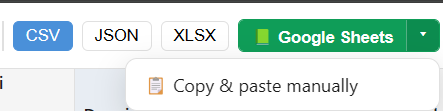
Table after collectionActual CrawlRover table with business rows, Google Maps fields and enrichment results.
Export a Google Maps result to Excel or Google Sheets
Export the resultChoose CSV, JSON, XLSX, Google Sheets or manual copy.

Click the table again, press Esc, or click outside to close

Decision guide

When to choose Google Maps

Start with the source that best matches your market and required fields. Use another map only for the gaps that matter.

Global coverage varies by feature and region

International business discovery

North AmericaEuropeAsiaLatin AmericaAfricaOceania

Google Maps supports a consistent research workflow across countries, especially for chains, travel and international services.

Listing and attribute availability varies by country, category and individual business. The page does not promise identical coverage for every row.

Current Google Maps Platform coverage table · 2026-08-25 ↗

Best suited to

🌍Multi-country research

Use one discovery workflow to compare local markets, cities and chains across borders.

🏨Travel and hospitality

Research hotels, restaurants, attractions and services with ratings, hours and service attributes.

🏢Chains and branches

Collect brand locations across cities and preserve Place IDs and coordinates for repeatable analysis.

Strengths

🧭Place ID, Plus Code and coordinates

Stable identifiers and geographic fields make locations easier to verify and match.

🅿️Service attributes

Parking, payment methods, accessibility and other signals support service-level segmentation.

🕐Popular times and opening hours

Visible busyness and hours add context for demand research and follow-up checks.

🗂️Structured place categories

Place types are useful when normalising and comparing international datasets.

Limits to account for

Coverage is not uniform

A listing may omit a website, phone, menu, popular times or individual amenities.

No exact average check

A price level is not a monetary amount; Yandex Maps can add more local price context.

Less local context

Nearby transit, products, jobs and building details are often better covered by Yandex Maps or 2GIS.

Four data layers

Know where every value comes from

Map collection, website enrichment and calculated estimates answer different questions. CrawlRover keeps those layers conceptually separate.

01

Native Google Maps data

22 field positions and up to 53 normalized columns from public map listings.

02

Observable website signals

CMS, analytics, chats, booking, payment, domain and infrastructure signatures when a company website is known.

03

Calculated estimates

Digital maturity, website health and growth signals derived from available observations. These are estimates, not company-declared facts.

04

Fields from other maps

Selected gaps can be filled from the other supported maps when the same company can be matched with enough confidence.

How enrichment works →

Native map fields

What can appear in the table

22 field positions can expand into up to 53 normalized columns. A position is a business concept; columns are its separate exported values.

from map listing-dependent
Core data 7 positions
Name from map 1 col.
Category & rubrics from map 3 col.
Address (full) from map 1 col.
Address components (region/street/house) from map 5 col.
Country code (ISO) from map 1 col.
Coordinates from map 2 col.
Card link · Place ID from map 4 col.
Contacts & channels 2 positions
Phones from map 2 col.
Website from map 1 col.
Ratings & reviews 4 positions
Rating from map 1 col.
Review count from map 1 col.
Ratings · photos count listing-dependent 1 col.
Reviews: text, dates, replies from map 7 col.
Hours, prices, services 6 positions
Opening hours from map 1 col.
Average check · price level from map 1 col.
Features & amenities from map 4 col.
Description · about from map 2 col.
Popular times (busyness) from map 3 col.
Menu from map 5 col.
Location & building 2 positions
Businesses in building (mall/office) from map 1 col.
Time zone from map 1 col.
Media & commerce 1 positions
Photos (albums) from map 5 col.

Verified catalogue: 2026-08-21. Filled fields depend on the public listing and collection scenario. Compare all five maps →

Website enrichment

Turn a map listing into a better-qualified company record

When the listing contains a public website, CrawlRover can inspect observable HTML and infrastructure signatures and return them in separate enrichment fields.

Analytics and advertising

Google Analytics 4Google Tag ManagerYandex MetricaMeta PixelMatomoHotjar

CMS and commerce

WordPress1C-BitrixTildaShopifyWixOpenCart

Chats, booking and payments

JivoSiteIntercomYCLIENTSbooking widgetspayment signatures

Domain and infrastructure

domain ageSSLDNSSPFDKIMDMARC
How to interpret the result

A detected HTML signature indicates that characteristic code was observed during the scan. It does not prove that tracking, payment or a widget is configured correctly at runtime. Digital maturity, website health and growth indicators are calculated estimates and should be used for prioritization, not as verified company statements.

Explore website enrichment fields →

Questions and boundaries

Questions about the Google Maps scraper

What is Google Maps best suited for?
It is a strong starting point for international discovery, city comparisons, chains, travel and services where Place IDs, coordinates, ratings and service attributes matter.
Will every Google Maps field be populated?
No. CrawlRover preserves what is publicly visible in each listing. Availability depends on the country, category, business and sections exposed by the listing.
Which maps complement Google Maps?
Yandex Maps can add local price and transit context, while 2GIS is useful for products, jobs, businesses inside buildings and deeper address structure.
Is there a free Google Maps scraper?
Yes. New accounts get a 7-day trial after email sign-in. You can then stay on Free for up to 300 map business listings per month and basic CSV export.
How much does the Google Maps scraper cost?
A 24-hour Day Pass is €9. The Data plan is €19 per month and includes up to 25,000 map business listings.
How do I export Google Maps to Excel or Google Sheets?
Open the map, start collection, review the built-in table and choose XLSX or Google Sheets. These formats are available during the trial, with a Day Pass and on paid plans.
Which browser package includes Google Maps?
Google Maps is included in the CrawlRover package for Microsoft Edge. The Chrome Web Store package does not include Google Maps. The full website package combines all five maps during the trial or on a paid plan.
Can company websites add more fields to Google Maps rows?
Yes. When a public company website is known, CrawlRover can inspect observable technology, analytics, domain and business signals. Website enrichment uses a separate plan allowance by company.
Is CrawlRover an official Google product?
No. CrawlRover is an independent tool and is not affiliated with Google. Users decide their purpose and are responsible for source terms and applicable law.

Collect Google Maps businesses and review the table

Start with your own category and city, then export only after checking rows, sources and the fields that matter to your task.

Five-map workflow

Compare another source before collecting

Each map has a different mix of geography and fields. Open the provider page that can answer your missing question.
